Loudness
Loudness Implementation Guidance
The audioAnalysis object provides track-level loudness and peak metadata that can be used by clients to understand, compare and normalise audio playback levels.
Tuned Global makes the audioAnalysis object available in both the Catalogue Feed (CF) and the broader API service.
The loudness values are generated through automated audio analysis and provide an objective measurement of the loudness characteristics of a track.
Example Payload
 {
  "audioAnalysis": {
    "integratedLufs": -8.7812204360961914,
    "loudnessRange": 3.3006458282470703,
    "truePeakDbfs": 0.57202285528182983,
    "maxTruePeakDbfs": -1.0,
    "dbOffset": -5.2187795639038086,
    "normalizationMultiplier": 0.54835400757719666,
    "analysisVersion": 1,
    "pluginVersion": "audio_analysers_v7"
  }
}
How to Interpret the Values
integratedLufs
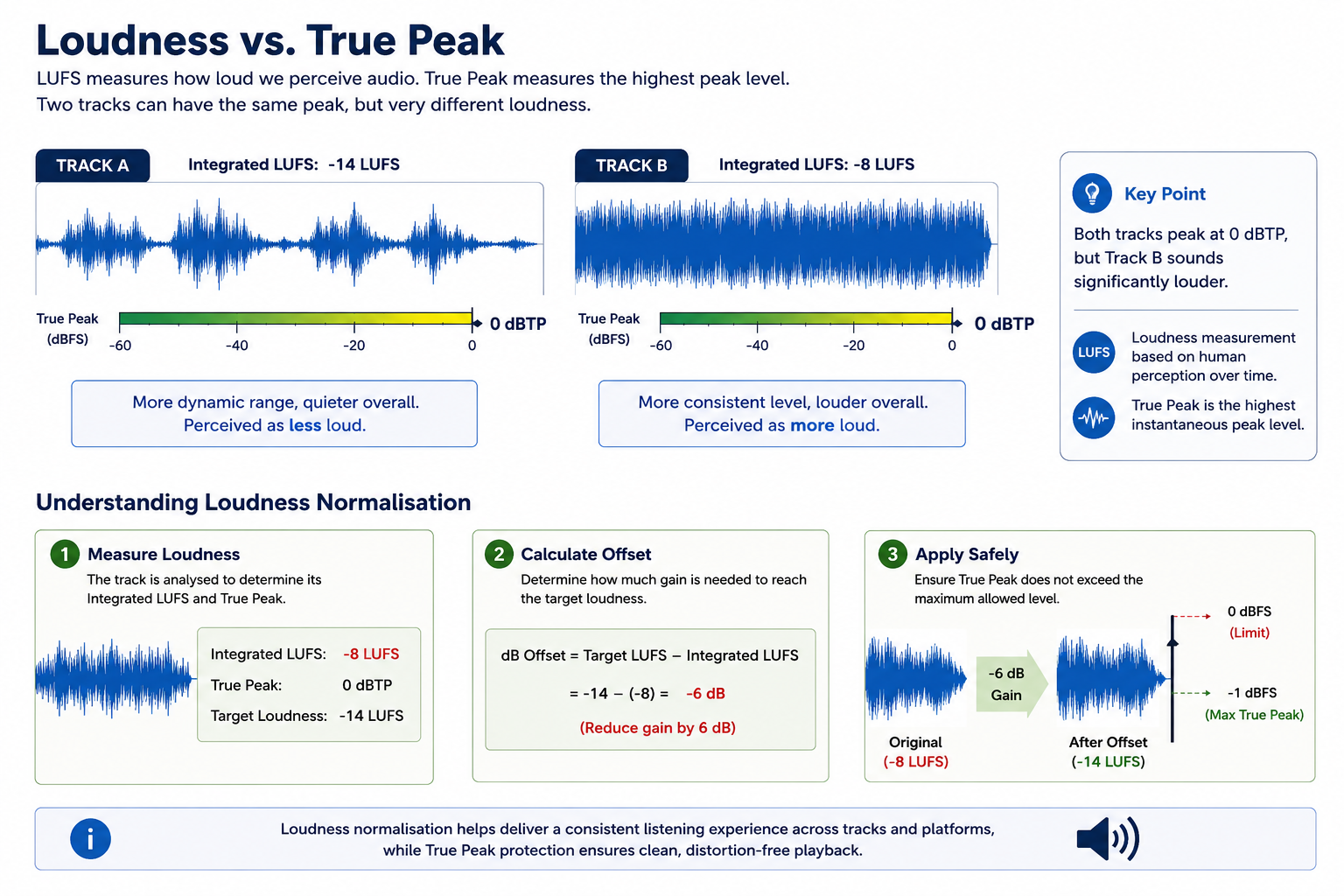
integratedLufs represents the perceived loudness of the track across its full duration. A value closer to zero means the track is louder.
For example:
-8 LUFS | Louder than common streaming reference levels |
-14 LUFS | Common streaming loudness reference |
-18 LUFS | Quieter than common streaming reference levels |
The difference between the LUFS value of two tracks is measured in decibels (dB). For example, a track with a loudness of -8 LUFS is approximately 6 dB louder than a track measured at -14 LUFS, even if both tracks have similar peak levels.
truePeakDbfs
truePeakDbfs represents the highest detected peak in the audio signal. A value closer to zero means there is less headroom available before clipping occurs.
Unlike LUFS, which measures perceived loudness across the entire track, True Peak measures the highest instantaneous audio peak. Two tracks may have identical True Peak values but significantly different LUFS values and therefore sound noticeably different in loudness.
loudnessRange
loudnessRange represents the variation in loudness throughout the track. A higher value generally means the track has more dynamic contrast between quieter and louder sections.
Lower values typically indicate a more compressed and consistently loud recording.
Loudness Normalisation
Many streaming services use a loudness reference of approximately -14 LUFS when normalising playback.
A client that wishes to implement its own loudness normalisation may calculate an offset using the following formula:
dbOffset = targetLufs - integratedLufs
Where: targetLufs = -14
Examples:
-18 LUFS | -14 - (-18) | +4 dB | Increase playback gain |
-14 LUFS | -14 - (-14) | 0 dB | No adjustment |
-10 LUFS | -14 - (-10) | -4 dB | Reduce playback gain |
-8 LUFS | -14 - (-8) | -6 dB | Reduce playback gain |
A negative dbOffset is expected when a track is louder than the chosen reference level.
True Peak Safety
When increasing playback gain, clients should consider the available True Peak headroom to avoid clipping.
Example: truePeakHeadroomDb = maxTruePeakDbfs - truePeakDbfs
If:
integratedLufs = -18 truePeakDbfs = -2 maxTruePeakDbfs = -1
Then:
dbOffset = +4 dB truePeakHeadroomDb = +1 dB
Although the loudness calculation suggests increasing the track by 4 dB, only 1 dB of headroom exists before the configured maximum true peak level is exceeded.
Clients implementing their own loudness normalisation may choose to cap the gain increase, apply limiting, or use alternative processing strategies.
Tuned Global dB Offset
Tuned Global provides a pre-calculated dbOffset value within the audioAnalysis object.
The dbOffset is calculated using:
- Target Loudness: -14 LUFS
- Maximum True Peak: -1 dBFS
This value is intended to provide a simple implementation path for clients that do not wish to perform their own loudness calculations. Clients may apply the returned dbOffset directly during playback to achieve more consistent loudness levels across tracks.
Interpretation of the returned value:
Positive | Increase playback gain |
Zero | No adjustment required |
Negative | Reduce playback gain |
Examples:
-18 LUFS | +4 dB | Increase playback gain |
-14 LUFS | 0 dB | No adjustment required |
-8 LUFS | -6 dB | Reduce playback gain |
In the example above, a track measured at -8 LUFS is approximately 6 dB louder than a track measured at -14 LUFS and therefore receives a -6 dB offset.
The returned dbOffset has already been calculated by Tuned Global and may be applied directly by the client.
normalizationMultiplier
For clients that prefer a linear gain value rather than a decibel adjustment, Tuned Global also provides a normalizationMultiplier.
This value represents the gain adjustment as a multiplication factor.
Examples:
+6 dB | 1.995 |
+3 dB | 1.413 |
0 dB | 1.000 |
-3 dB | 0.708 |
-6 dB | 0.501 |
Clients may multiply the audio output level by this value instead of converting the dB offset themselves.
Important note
The values contained within the audioAnalysis object are measurements and recommendations only.
They do not alter the underlying audio asset stored by Tuned Global.
Any gain adjustment, limiting, attenuation or normalisation is applied by the client during playback or downstream audio processing.


On this page
- Loudness