Shadow Queue quickstart
Build shared, in-sync listening experiences such as social rooms, hosted radio sessions, watch parties, and bot-driven rooms.
Shadow Queue is the API-controlled implementation option for Unified listening. It allows your application to create and manage a single server-side queue that multiple listeners can follow in sync.
A ShadowQ “shadows” what a room is playing. One participant, usually the host, builds the queue. Other participants, including read-only users or non-interactive bots, read the same queue and play it in lockstep. Because every track includes epoch-stamped start and end times, clients can calculate the current playback position and stay synchronised without talking to each other.
The ShadowQ APIs support queue creation, track management, synchronised playback state, device entitlement, signed CDN playback, and play logging.
For a high-level explanation of Unified listening and how ShadowQ compares with Plaidio, see the Unified listening overview.
Quickstart
Build a working ShadowQ in ~10–15 min.
Auth → Register device → Build a queue → Fetch the shared queue → Play a track from a signed CDN URL
Playground
Interactive tool to test the ShadowQ scenario end-to-end.
At a glance
- One shared queue, many listeners. A queue is created once and read by every participant in the room from a single
queueId. - Synchronised by design. Each queued track returns
EpochStartandEpochEnd, so clients can calculate the accurate “now playing” position and support seamless transitions without peer-to-peer sync. - Read it without a user context. Fetching the queue uses the Metadata API so it can be shared without a user session. This is useful for read-only participants, dashboards, and bots that need to join or leave a room while clients continue to fetch the current queue.
- Build it with a user context. Creating a queue and adding tracks uses the Services API, authenticated as the host user.
- Production playback built in. Device entitlement, signed CDN stream URLs, and licensing-compliant play logging use the same endpoints used by full DSP integrations.
How it works and why two APIs
ShadowQ deliberately spans two APIs,. The API used depends on whether the operation needs a user context.
- Creating a queue and adding tracks happen on the Services API because these actions require a user context.
- Reading the queue happens on the Metadata API because the queue needs to be shareable without a user context.
Create a queue | Services v3 | Yes, the host user | |
Add tracks to a queue | Services v3 | Yes, the host user | |
Read the queue | Metadata v2.4 | No, shareable | |
Read recent play history | Metadata v2.4 | No, shareable |
Why is GET ShadowQ on the Metadata API?
Reading the queue is intentionally kept on the Metadata API so it can be shared without a user session.
Some rooms may create a queue without tying every participant to the same user context. You may also want bots or read-only participants to join and leave a room while clients keep fetching the current queue.
Keeping queue reads on the Metadata API makes the queue a shared, cacheable resource rather than something tied to one user’s session.
What you'll build
A complete, in-sync social-listening flow:
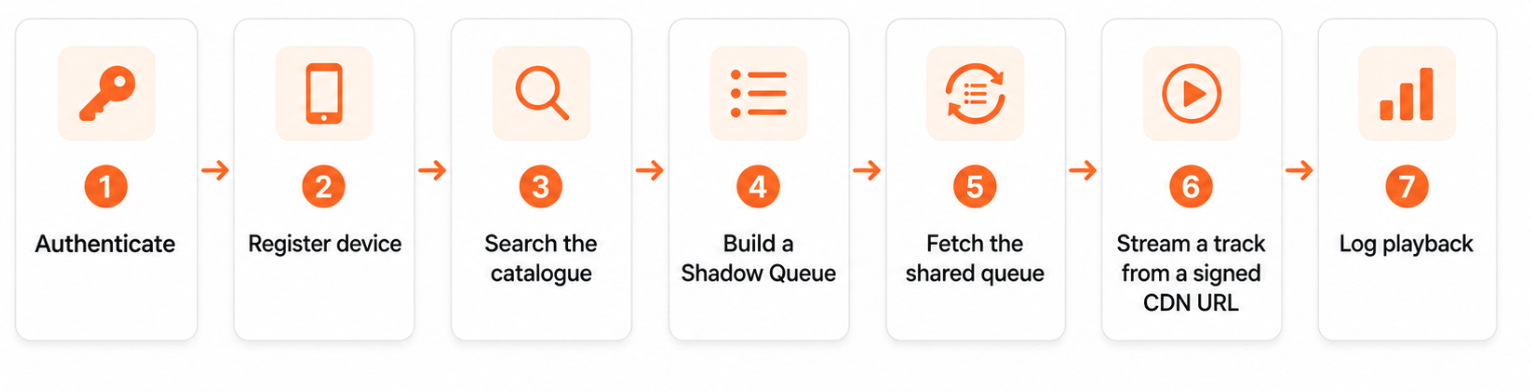
This gets you to time-to-first synchronised play quickly. You can then layer on rooms, presence, bots, adaptive queues, feedback, and play-history catch-up afterwards.
Important: Do not skip device registration.
Before any participant can turn a queued track into a playable CDN URL, the device must be registered and authorised for that user. This step is easy to miss because it sits between building the queue and playback.
Connecting APIs to UX
A typical room UI maps onto the APIs like this:
Room queue / Up next | |
Now playing and progress bar |
|
Host add-to-queue control | |
Play button | POST |
Recently played |
API Quick Start Guide (~10–15 minutes)
This quick start demonstrates an end-to-end Unified listening integration with ShadowQ.
You will authenticate, register a playback device, search the catalogue, build a shared queue, fetch that same queue without a user context, stream a track from a signed CDN URL, and log the play.
Prerequisites
Before you start, make sure you have:
- API keys from Tuned Global, including a
StoreId - A test user account
- A user token with the required scopes
- Postman workspace configured, or
curl - Test user account credentials
Your user token should include scopes for:
shadow-queue:readshadow-queue:writeuser:readuser:writecatalogue:readtrack:play
Step-by-step
1
Step 1: Authenticate
Request a JWT token from the authentication server using your test credentials.
Purpose: Establishes the host user's session and the scopes needed to build and play a ShadowQ.
 curl --location 'https://api-authentication-connect.tunedglobal.com/oauth2/token' \
--header 'StoreId: XXYY' \
--header 'Content-Type: application/x-www-form-urlencoded' \
--data-urlencode 'grant_type=password' \
--data-urlencode 'username=testUserName' \
--data-urlencode 'password=testPassword'
Use the returned access_token as Authorization: Bearer xxxyyyy on every call below. The authorisation server URL can be discovered at runtime via GET /api/v3/application/grantURL.
2
Step 2: Register a device
Authorise a playback device for the user before attempting to stream.
Purpose: Playback is entitled per-device. A queued track cannot be turned into a CDN URL until the device that will play it is registered to the user. This step is easy to miss — it sits between building the queue and playing it.
 curl --location --request POST 'https://api-services-connect.tunedglobal.com/api/v3/users/me/device' \
--header 'StoreId: XXYY' \
--header 'Authorization: Bearer xxxyyyy' \
--header 'Content-Type: application/json' \
--data '{
  "DeviceType": "iPhone 15 Pro",
  "DisplayName": "Living Room iPhone",
  "UniqueId": "F2A1C0DE-1234-4A5B-9C8D-0011AABBCCDD",
  "DeviceOS": "iOS",
  "DeviceManufacturer": "Apple",
  "DeviceCategory": "Mobile",
  "LastOSVersion": "17.4.1",
  "LastAppVersion": "3.2.0"
}'
Required fields (AuthDeviceModel):
DeviceType | Yes | string | Model or device type, e.g. iPhone 15 Pro |
DisplayName | Yes | string | Human-friendly name shown to the user |
UniqueId | Yes | string | Stable per-device identifier (e.g. IDFV / install UUID) |
DeviceOS | Yes | string | iOS, Android, Web, … |
DeviceManufacturer | Yes | string | Apple, Samsung, … |
DeviceCategory | Yes | string (enum) | One of Mobile, TV, Wearable |
LastOSVersion | No | string | e.g. 17.4.1 |
LastAppVersion | No | string | e.g. 3.2.0 |
ApplicationId | No | integer | App/store application id, if applicable |
Carrier | No | string | Mobile carrier, if applicable |
Returns — Response[UserAuthDeviceResponseModel]:
 {
  "Value": true,
  "Device": {
    "DeviceId": 23750200,
    "DeviceType": "iPhone 15 Pro",
    "UniqueId": "F2A1C0DE-1234-4A5B-9C8D-0011AABBCCDD",
    "DisplayName": "Living Room iPhone",
    "DeviceOS": "iOS"
  }
}
Keep Device.DeviceId — you'll pass it to every playback call as {deviceId}.
Already have a device, or it stopped working?
A device can be deauthorized when a different user logs into it, so for the most reliable, current device list, read the user's profile and pick the device from Devices[]: GET/api/v3/users/{userId}/profile. The response contains a Devices array of UserDevice objects, each with a DeviceId.
3
Step 3 — Search the catalogue
Find the tracks you want to seed the queue with, and collect their Tuned Global track IDs.
Purpose: Queue creation and track-add operations both take arrays of track IDs.
 curl --location 'https://api-metadata-connect.tunedglobal.com/api/v2.4/search/songs?q=Bohemian%20Rhapsody&count=5' \
--header 'StoreId: XXYY'
Note the TrackId of each result you want to queue.
4
Step 4: Create a ShadowQ
Create the shared queue. This is a Services API call made as the host user.
Purpose: Returns a queueId that every participant in the room will use to read the queue.
 curl --location --request POST 'https://api-services-connect.tunedglobal.com/api/v3/shadow-queues' \
--header 'StoreId: XXYY' \
--header 'Authorization: Bearer xxxyyyy' \
--header 'Content-Type: application/json' \
--data '{
  "SourceType": "Station",
  "TrackIds": [987654, 987655, 987656]
}'
Body (CreateShadowQueuePayload):
SourceType | Yes | string (enum) | Station |
TrackIds | Yes | integer[] | Initial tracks to seed the queue |
Returns the queueId as a string. Hand this to clients and bots so they can read the queue. The queueId is continuous across both APIs — pass it straight to the Metadata read in Step 6. SourceType is not strictly enforced; send Station (Playlist/Album are also accepted).
5
Step 5: Add tracks to the queue
Append more tracks to an existing queue as the room evolves.
Purpose: Lets the host (or your room logic) extend the shared queue after creation.
 curl --location --request POST 'https://api-services-connect.tunedglobal.com/api/v3/shadow-queues/QUEUE_ID/tracks' \
--header 'StoreId: XXYY' \
--header 'Authorization: Bearer xxxyyyy' \
--header 'Content-Type: application/json' \
--data '[987657, 987658]'
The body is a plain JSON array of track IDs.
6
Step 6 — Read the shared queue
Fetch the current queue. This is a Metadata API call and needs no user context — any participant or bot can call it with just the StoreId.
Purpose: This is the shared, synchronised view of the room. Every client reads the same queue and uses the epoch timestamps to render an accurate 'now playing' position.
 curl --location 'https://api-metadata-connect.tunedglobal.com/api/v2.4/shadow-queues/QUEUE_ID/tracks?lastTrackEnd=0' \
--header 'StoreId: XXYY'
Returns — ShadowQueueTracksResponseModel:
 {
  "QueueStatus": "Active",
  "Tracks": [
    {
      "TrackId": 987654,
      "EpochStart": 1709596800,
      "EpochEnd": 1709597154,
      "Track": { "TrackId": 987654, "Name": "…", "Duration": 354 }
    }
  ]
}
EpochStart/EpochEndare wall-clock seconds — use them to compute the current playback position so every participant stays in sync.- Pass
lastTrackEnd(seconds) to fetch only the tracks that come after a point you've already seen. - To show recently played tracks (last 3 hours), call GET
/api/v2.4/shadow-queues/QUEUE_ID/play-history.
7
Step 7: Stream a track (signed CDN URL)
Turn the current track into a playable, signed CDN URL for the registered device. This is a single call — POST the stream endpoint with an empty body (no prior token call needed).
Purpose: Validates the user's entitlement and the device's rights, then returns a short-lived CDN URL.
Required inputs: Tuned Global TrackId, the registered DeviceId from Step 2, and the bearer token.
curl —location —request POST \
—header ‘StoreId: XXYY’ \
—header ‘Authorization: Bearer xxxyyyy’ \
—header ‘Content-Length: 0’
Returns the signed CDN URL as a string. CDN URLs are short-lived — request one close to playback time. Query parameters: streamType (Music | Podcast | Audiobook, default Music), streamProvider (Tuned | External, default Tuned), and optional assetType to override audio quality.
8
Step 8: Log playback
Submit playback events for analytics and royalty reporting. For ShadowQ playback, set Source to Queue.
Purpose: Captures play data correctly from day one for licensing/compliance.
 curl --location --request POST 'https://api-services-connect.tunedglobal.com/api/v3/plays/23750200' \
--header 'StoreId: XXYY' \
--header 'Authorization: Bearer xxxyyyy' \
--header 'Content-Type: application/json' \
--data '{
  "TrackId": 987654,
  "LogPlayType": "Start",
  "Seconds": 0,
  "Source": "Queue",
  "Country": "AU",
  "PlayerType": "MobilePhone"
}'
Recommended events: play start, the 30-second milestone (mandatory for reporting), skip events with timestamps, and end of file. LogPlayType is one of Start, Progress, End, Skip.
Expected results
- A registered device with a usable
DeviceId - A
queueIdthat returns the same queue to every participant - A queue read that returns tracks with
EpochStart/EpochEnd - A signed CDN URL that plays audio
- Play log entries recorded for the user, device and track
- HTTP 200 responses with valid payloads throughout
Troubleshooting
403 on the stream call:
Token expired, user not entitled, or the device isn't registered/authorised — revisit Step 2 and confirm the DeviceId belongs to this user via GET /api/v3/users/{userId}/profile.
- Device shows as unknown / playback denied after a re-login: The device may have been deauthorized when another user logged into it. Re-register it (Step 2) or pick the current device from the profile's
Devices[]. - Queue read returns empty: Confirm you're calling the Metadata host (
api-metadata-connect), that thequeueIdis correct, and that tracks were added. Drop or lowerlastTrackEnd— too high a value filters everything out. - Shadow-queue calls return 401/403: The token is missing
shadow-queue:read/shadow-queue:writescopes — re-authenticate with a user/app that has them. - Missing play logs: Verify
TrackId,DeviceId,Secondsand that you sent the 30-second milestone.


On this page
- Shadow Queue quickstart