Getting Started
Catalogue Feed (CF)
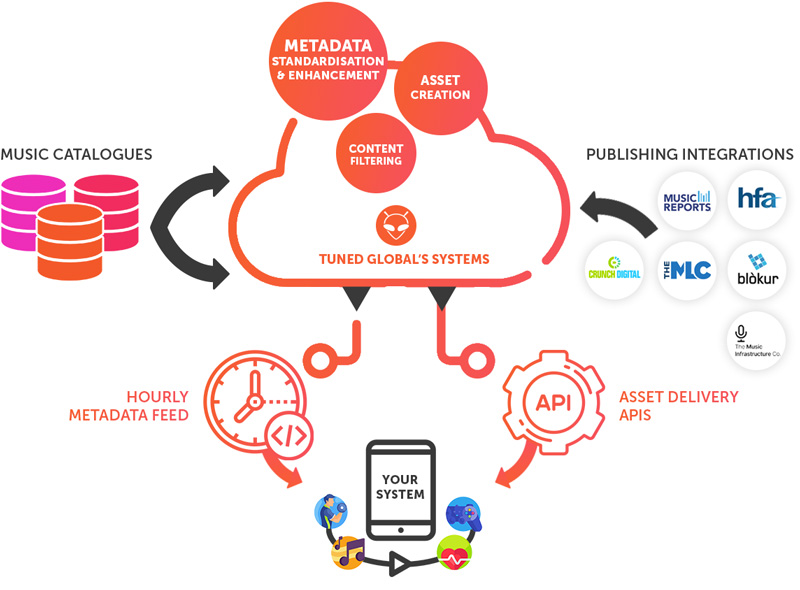
The Catalogue Feed (CF) is Tuned Global's solution for clients who want to run their own music platform using our catalogue. Rather than building on top of Tuned Global's white label apps, advanceAPIs or web player. The client takes ownership of the experience, using our catalogue feed as the foundation while building their own applications or apis on top of it.
This is the right path if you're building a bespoke music experience, your own apps, search, playlisting, user accounts, and more. Tuned Global handles the ingestion, standardisation, and enrichment of catalogue metadata, along with the storage of audio files and artwork. You handle everything your users see and interact with.
As part of your agreement, you send us play activity data so that Tuned Global can produce accurate end-of-month reports for rights holders and labels.
Where a client prefers to not manage any APIs or metadata, Tuned Global has a broad range of Advanced API (aAPI) solution that manages these requirements. You can use a Catalogue Feed together with the broader APIs where the use case requires both. Discuss your requirements with the Tuned Global team for correct configuration.
Integration Overview
You connect to our catalogue delivery system once via a shared data feed, pull down your catalogue metadata and assets, and then report back every time a track is played. That's it.
The feed setup is a one-time configuration. Metadata ingestion is your team reading and storing our catalogue data. Asset downloads happen on-demand as users request content. Play logging is the mechanism that drives both label reporting and your monthly billing, so it's important to get right.
Step-by-Step Integration
Step 1: Feed Setup
Configure the JSON feed that Tuned Global will write your catalogue JSON data to. There are three options:
Option | Who configures it | What you provide |
TG-hosted S3 | Tuned Global | Nothing, we share the bucket details, access key, and secret key. |
Client S3 | Client | YouCreate an S3 bucket in your AWS account and provide us the bucket details and access keys so our CDS can write JSON files to it |
Your SFTP | Client | Share SFTP credentials so our system can export JSON files to your server |
Evaluation / trial? You can download a sample JSON file here — it contains 200 albums from a test catalogue. No feed setup required to get started.
Step 2: Metadata Ingestion
Once the feed is live, begin consuming the JSON files from S3 or SFTP and persisting the metadata in your system.
Key things to handle at this stage:
- Rights enforcement — apply territory, platform, and label restrictions accurately as you ingest. This is a label requirement and errors here are difficult to correct downstream.
- Asset references — the JSON contains references to images and audio assets. Use the Asset APIs to download these separately.
Step 3: Asset Delivery (Songs & Images)
When a user requests a track or artwork, call the relevant API to retrieve the file:
- Stream API — downloads the audio asset
- Image API — downloads album or track artwork
Important — implicit fetch logging: Every call to the Stream API automatically generates a fetch log on our side. These logs are aggregated at month-end to calculate the per-play fees payable to Tuned Global. No additional action is needed from you here, but you should be aware that each asset download is a billable event.
Step 4: Play Logging (LogPlay API)
Call the LogPlay API every time a track is streamed by an end user.
This is separate from the fetch log in Step 3:
Log type | Who creates it | Purpose |
Fetch log (Step 3) | This iss created automatically by our system on each Stream API call | TG's Monthly billing to you |
Play log (Step 4) | Sent explicitly by your system on each user play event | Label reporting and royalty distribution |
Both are required. The fetch log alone, which is automated, is not sufficient for label reporting, you must send the explicit LogPlay event on every user-initiated stream.
Once you're familiar with the integration steps above, checkout the integration models below to determine which one best fits your use case and infrastructure requirements.
Integration Models
Integration Models
The CDS supports three different integration models, Depending on your infrastructure appetite and budget, you can choose how much content you store yourself versus stream on demand from Tuned Global. The three models below go from maximum client control to minimum client storage overhead.
Model 1 — Full Storage
You store everything: metadata, images, and audio
You pull the full catalogue i.e. metadata, artwork, and audio files and host it all on your own infrastructure. Every asset is available locally, so your platform has no dependency on Tuned Global's systems at playback time. The only touchpoint back to Tuned Global is logging each play via our LogPlay API whenever an end user streams a track.
Best for clients who need maximum independence, have the storage capacity, and want full control over delivery performance.
Model 2 — Store Metadata & Images, Stream Audio On Demand
You store metadata and images. Audio is fetched live from Tuned Global when a user presses play.
You host the catalogue metadata and artwork, but audio files are never stored on your side, they're delivered by Tuned Global's systems in real time when a user requests a track. Since audio files are by far the largest assets, this significantly reduces your storage costs and infrastructure complexity. As with Model 1, each play must still be logged back to Tuned Global via the LogPlay API as an end user streams a track.
Best for clients who want a responsive catalogue experience without the overhead of managing large audio libraries.
Model 3 — Store Metadata Only, Stream Everything Else On Demand
You store metadata only. Images and audio are both fetched live from Tuned Global when needed.
You hold only the catalogue metadata. Artwork and audio are delivered on demand by Tuned Global, meaning images can also be served at any size or resolution your application requires, without you needing to manage image variants. As with all integration models, each play must still be logged back to Tuned Global via tthe LogPlay API API whenever an end user streams a track.
Best for clients who want the lightest possible infrastructure footprint and are happy to rely on Tuned Global's delivery systems for all media.


On this page
- Getting Started